Manage Records in Funds
List of operations you can perform on records in Funds
- 1. Create Custom filters to classify records as per your requirements. You can be able to limit your search to selected columns and search criteria.
- 2. Search desired records.
- 3. Go to top left of the List view to perform following bulk operations
-
- Click Delete button to delete selected record(s) in List view.
- Click Mass Edit button to edit selected record(s) in List view.
-
4. Click Settings icon
 at the top to perform following operations
-
- Click Layout Editor to configure fields and customize the layout of fields.
- Click Workflow List to view / create new workflows on Funds module.
- Click Tool Tip Management to manage tool tip information.
- Click Field Formulas to add custom equations to custom fields.
List of operations you can perform on detail view of Fund record
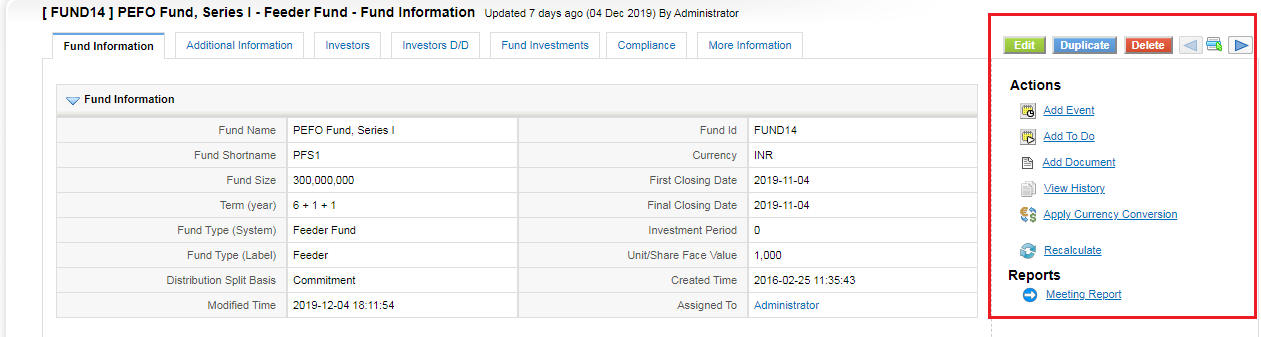
- 1. Click Edit to modify existing content.
- 3. Click Delete to delete the existing Fund record.
- 4. Click Duplicate to clone existing Fund record.
- 5. Click Add Document to attach a document to existing Fund record.
- 6. Click View History to to view history of changes made on Fund record.
- 7. Click Add Event to schedule a Call or Meeting and Select Add To Do to schedule a task.
- 8. View Reports.