• HELP CENTER
×
Getting Started CRM Deal Pipeline Portfolio Company Investors Funds Reports and Analytics System Administration Integration with Outlook and Gmail VDR FAQs Custom Settings

  • Create Funds manually
  • Quickly Create Funds
  • Edit Fund's Details
  • Fund Information
  • Additional Information
  • Investors
  • Investors Drawdown / Distribution
  • Portfolio Investments
  • Compliance
  • More Information
  • Fund Information
  • Additional Information
  • Investors
  • Investors Drawdown / Distribution
  • Fund Investments
  • Compliance
  • More Information
  • Fund Information
  • Additional Information
  • Investors
  • Investors Drawdown / Distribution
  • Portfolio Investments
  • Fund Investments
  • Compliance
  • More Information
  • Fund Information
  • Additional Information
  • Investors
  • Investors Drawdown / Distribution
  • Portfolio Investments
  • Fund Investments
  • Compliance
  • More Information
  • Fund Information
  • Additional Information
  • Investors
  • FoF Drawdown / Distribution
  • Portfolio Investments
  • Compliance
  • More Information
  • Activities
  • Documents
  • Delete Funds
  • Manage Records in Funds
  • Currency Conversion

Help Center > null > Manage Records in Funds > Delete Funds

Delete Fund


To delete fund
  1. Click on Funds option in the main menu.
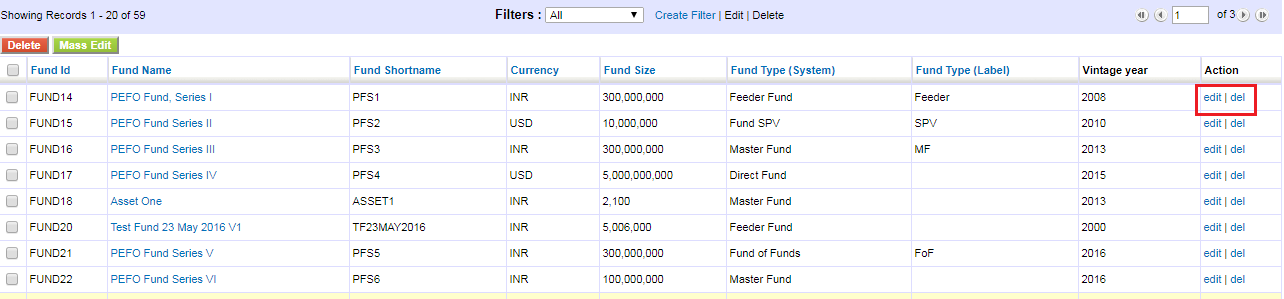
  2. In the funds list view, click delete under action.

Copyright @ 2013. Sumantra Tech Services Private Limited. All Rights Reserved.