Deal Pipeline Information
This tab contains basic information about the Deal. Fields in this tab along with their description are given below.
Deal Pipeline Information
| Deal Name | Provide name of the Deal. |
| Deal Code | Shows auto-generated code of the Deal. |
| Deal Stage | Select the current stage of the Deal. |
| Date Opened | Select the date when the Deal got opened. |
| Deal City | Enter the City. |
| Investee Company Name | Provide Investee Company name related to the deal. |
| GP Office | Select General Partner's office location. |
| Assigned To | Shows the User or Group to which Deal is assigned. |
| Deal Sector | Select sector of the Deal. For example - Infrastructure, Finance, etc. |
| Deal Sub Sector | Select sub sector of the Deal based on sector selected earlier. |
| Focus | Checkbox - Yes / No |
| Listed Company | Select whether the company is Listed or Unlisted. |
| Referred By | Select Proprietary or Organization. |
| Organization | Select the Organization. |
| Proprietary | Select the Proprietary name. |
| Created Time | Shows created time of the Deal. |
| Created By | Shows created by of the Deal. |
| Description | Provide description of the Deal. |
| Modified Time | Shows last modified time of the Deal. |
| Investment Type | |
| Deal Leader | |
| Promoter 1 | |
| Promoter 2 | |
| Contact | |
| Type of Investment |
Investment Summary Panel
| Total Funding Requirement |
Investment Summary Panel (Direct Portfolio Investment)
| Deal Currency | |
| Deal Size (m) | |
| Deal Type | |
| Transaction Type | |
| Stake (%) | |
| Stakeholding |
Deal Metrics Panel
| Financial Year | |
| Enterprise Value(m) | Provide Enterprise Value (in million). |
| Revenue (m) | |
| Expected IRR |
Provide expected IRR (Internal Rate of Return). |
| P/E | Provide Price to EPS ratio. |
| Equity Value(m) | Provide Equity Value (in million). |
| EBITDA (m) | |
| Expected MoC |
Provide expected MoC (Multiple of Capital). |
Workflow
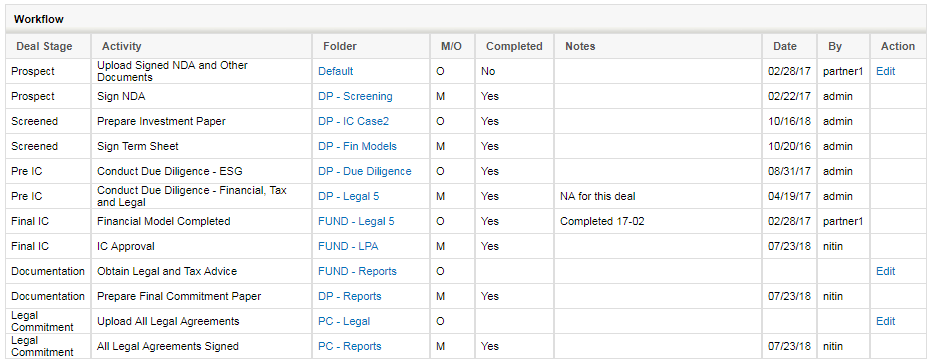
Workflow is to track various activities mapped to different stages of the deal.
- Deal Stage Stage of the deal at which an activity is expected to be completed.
- Activity Description of the activity
- Folder Clickable folder name where the documents associated with an activity should be uploaded
- M/O Indicates if an activity is Mandatory or Optional. Deal cannot move to the next stage unless mandatory activity for that stage has been done.
- Completed Shows if an activity has been done. Once marked as completed workflow entry cannot be edited.
- Notes User can enter any notes related to that activity for others to look at.
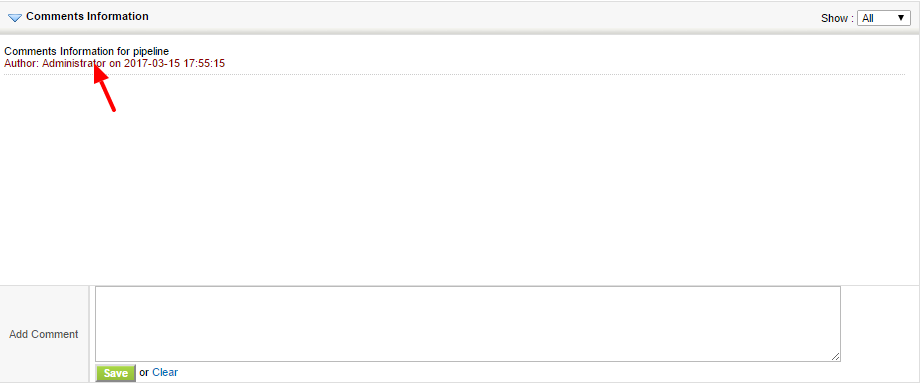
Comments Information: You can add comments to the pipeline.